


Customer ticket
“One of our servers dropped off the network about twenty minutes ago. Can someone take a look? It is the one in rack A05.”
Nordwind Logistik · Priority 2 · 14:12 CET
Loading
Loading
Live now13 missions · start free, no account
Interactive training for beginners and interview prep for Amazon, Microsoft, and Google: the decisions and troubleshooting a junior data center technician faces every day.


Datacenter Training is an independent training platform. We are not affiliated with, endorsed by, or partnered with any of the companies listed above. Their names appear only to describe the kind of roles this training prepares you for.
Interview practice based on candidate-reported questions and scenarios
Practice scenarios inspired by questions reported by candidates who interviewed for data center technician roles at companies such as Amazon.
Candidate-reported Amazon Data Center Technician interview scenario
Reported by a candidate who interviewed for an Amazon Data Center Technician role: the process when a server goes down. The ticket below is our practice scenario.
H1 · DR-1 · Rack A05
14:12
INC-4417 · 14:12 CET
“One of our servers dropped off the network about twenty minutes ago. Can someone take a look? It is the one in rack A05.”
Next: M8 · Documentation and DCIM
No device name, no cause. Before you walk over there, get what the customer can give you cheaply. Then you decide where to start, not me.
Where do you want to look next?
Findings: cause · repaired · verified
Weakest topic feeds your next recommended mission.
Mission console · product preview
The hall
Hall H1 is one building you walk through, not a diagram: the mantrap, the corridor, data room DR-1 with its rows and their signs, the meet-me room. The way to a rack is the way you would walk it, badge in hand.
The rack
This incident takes you to rack A05 in row A. Open the cabinet, inspect the equipment, and work from what is actually installed there. Other racks in the hall may be occupied, partially populated, or empty.
The hardware
Docked at HP-WEB-01 in U22, the host from the ticket: the hostname on the bezel, the LEDs, the power button. The inspect sheet beside it says what the world knows about the machine, position, owner, power and boot state, and every action you take is checked against that state.
How it works
The same four beats as a real shift: a ticket, a decision, a review, a record. Not lessons to watch. Missions to solve.
A customer request lands in your queue with a severity, a site, a cage and a deadline. Everything else you have to find out yourself.
Read the LEDs, check the feeds, trace the circuit, decide what to touch next. Every choice is scored on the spot, including what you do first.
Every call you make gets a comment, not just the outcome. Safety first, then method, then the note you leave for the next shift.
Your gap diagnosis turns into talking points you can defend in a hiring loop, backed by missions you have actually finished.
The first mission needs no account.
Enter the trainingMission preview
The same ticket as the console above, from Mission 201. Tick the steps to see the rack answer. The order is yours, as it is in the mission.
“One of our servers dropped off the network about twenty minutes ago. Can someone take a look? It is the one in rack A05.”
Nordwind Logistik · Priority 2 · 14:12 CET
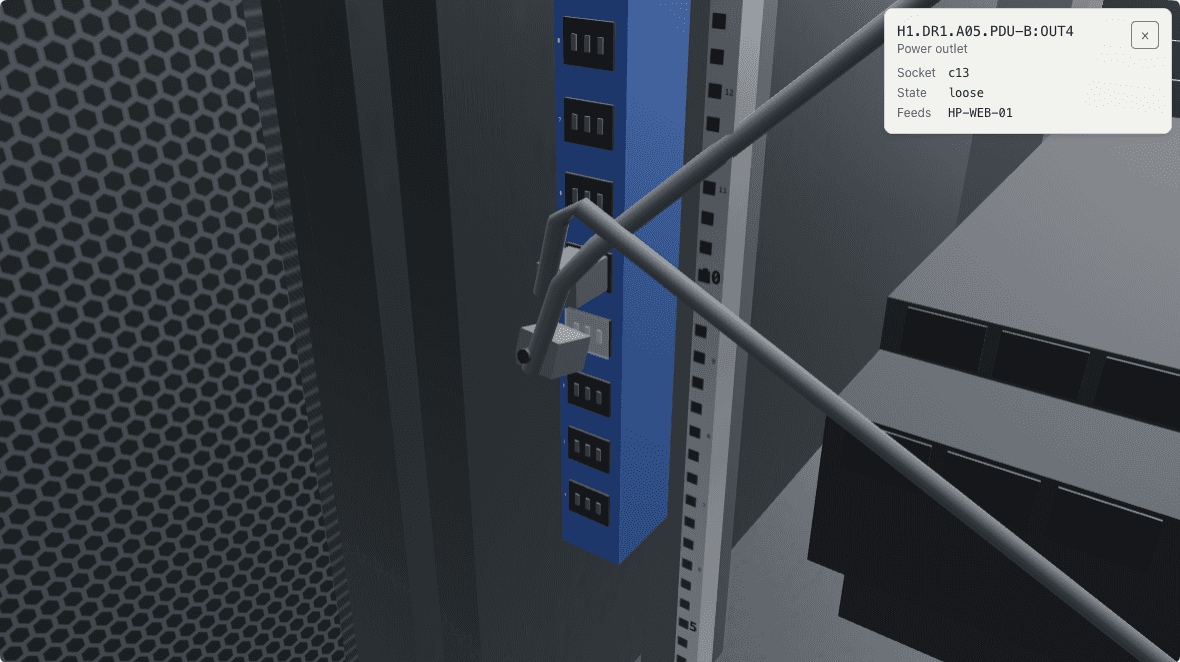
PDU-B is the second power feed at the back of rack A05. Outlet 4 feeds the host in U22. Product frame from the mission itself, in the state the checklist has reached.
No device name, no cause. Before you walk over there, get what the customer can give you cheaply. Then you decide where to start, not me.
The ticket closes when every step is done. The order is yours.
A taste of the flow. The real missions grade every decision across twenty interaction types, from rack clicks to a simulated terminal.
What you get
Every capability exists because a technician needs it in week one, not because it looked good on a feature list.
Every lesson opens as a job in the queue, not a chapter. You read the ticket, decide what to touch, and live with the consequences of the order you chose.
Designed around active practice, realistic decisions, explanatory feedback, retrieval and transfer, not passive reading or repetitive quiz questions. Every mission starts from the competency it has to build and works backward to the task that proves it.
Every decision gets an immediate, built-in review: what was right, what was risky, and what the strong answer sounds like, never handed to you before you have tried.
Written the way customers actually write them: vague, urgent, and missing the one detail you need. Learn to ask for it.
Measure U-height, plan the elevation, mount rails, manage weight and airflow, and label everything before you close the ticket.
Trace a circuit from cage to meet-me room. Single mode versus multimode, LC and MPO, patch panel positions, and the paperwork.
A/B feeds, PDU load balancing, breaker sizing, and what to do the second a redundant path drops during maintenance.
A server goes dark: triage power, link and hardware in order, swap the failed drive hot, and write the RMA notes that keep asset records true.
Type real commands (df -h, ip a, traceroute) into a simulated shell. Every line is graded, with the reasoning behind each verdict.
Open from day one: safety judgement, troubleshooting order, and a strong-answer comparison, plus a flashcard deck built from your runs.
A traffic light per topic (solid, shaky, gap) instead of a completion percentage. See exactly which competency needs another run.
Passing a mission (or logging the mistake it warns about) unlocks the matching interview flashcard. Due cards resurface on a spaced-repetition schedule: after 1, 3, 7 and 16 days.
Field notes
Practical guides to the work itself, written the way we would explain it to someone starting Monday.
What the job actually involves, what employers screen for, and a realistic path into your first technician role with no prior data center experience.
The structure of a technician hiring loop, the scenario questions that decide it, and how to answer them without sounding rehearsed.
Rack units, rails, elevations, weight distribution, airflow and labelling; the full sequence of a clean hardware installation.
FAQ
Something we have not covered? Contact the team. Replies come from the people building it, usually within a day.
Contact
A question, a partnership, something broken? Write us. Replies come from the people building the product.
Newsletter · New specializations
Leave your email and we'll let you know when a new specialization opens.
A short email when something new launches. Unsubscribe anytime with one click.
Thirteen missions, a simulated hall and a mentor who reviews your method. Start free in your browser. The first mission needs no account.
